

How to Register as an Event Organiser on RSRVIN
If you run concerts, parties, festivals, or any event where people need a ticket, you need somewhere to sell those tickets that does not involve a spreadsheet and a WhatsApp group. This guide shows you exactly how to register as an event organiser on RSRVIN, from the first form you fill in to the moment your event goes live and the first ticket sells. Every step below is shown with a screenshot, and no technical knowledge is required. If you can fill in an online form, you can do this.
Why Event Organisers Choose RSRVIN
Before the steps, it helps to know what you get at the end of them.
You pay nothing to join. Event Organisers have no subscription fee on RSRVIN. The platform earns through a service fee added at the point of ticket purchase, so you are not paying for a tool you have not used yet.
Your tickets are digital from the start. Every ticket carries a unique QR code and lands in the buyer's My RSRVIN section the moment they pay, along with an email confirmation. At the door, your staff scan the code and the system marks it as used, so the same ticket cannot walk in twice.
You see your sales as they happen. The dashboard shows tickets sold, revenue, and link clicks in real time. You can decide on staffing, stock, and layout from live numbers instead of guesswork.
You get paid on a known schedule. RSRVIN transfers the face value of your tickets within seven days of your event's end date.
You are discovered, not just visited. Your event appears on RSRVIN alongside everything else happening in your city, in front of people already looking for somewhere to go. You also get a promoter system, promo codes, and a Meta Pixel connection to push your own campaigns.
Step 1: Fill In the Registration Form
Registration starts at info.rsrvin.com/contact. This is the one and only entry point for organisers, so you do not need to hunt around the site for a different sign-up page.
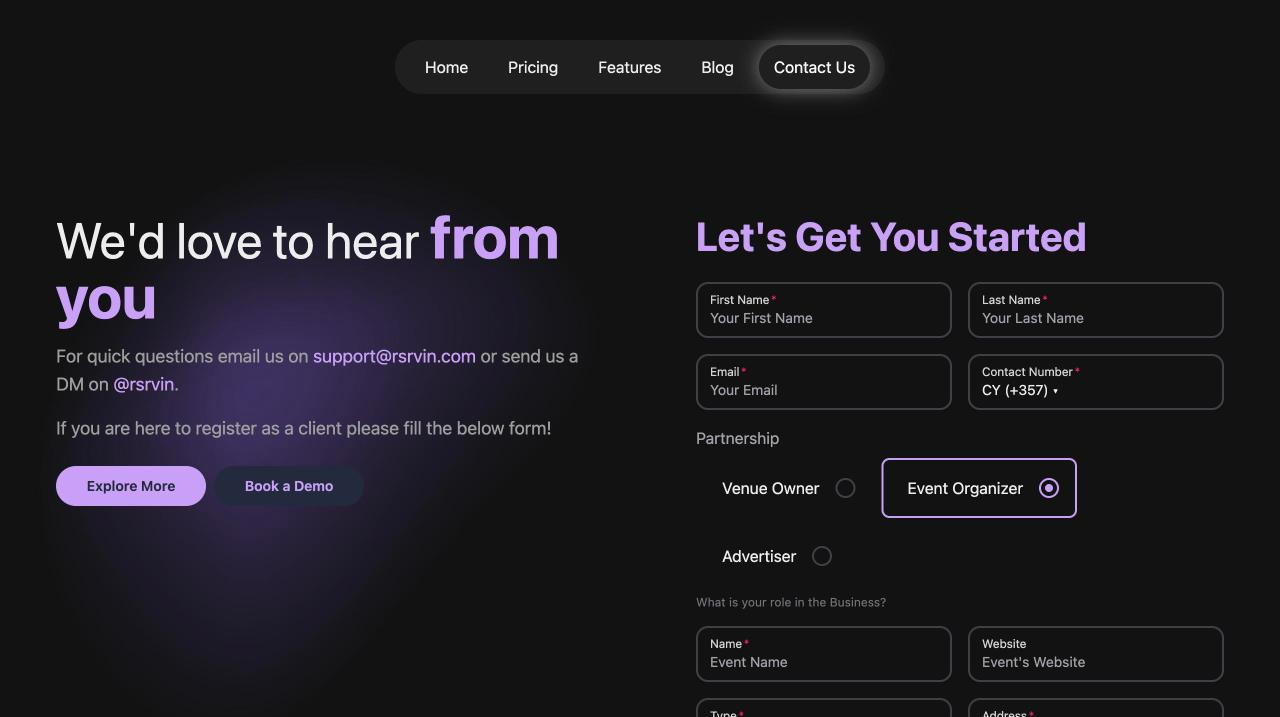
Fill in your first name, last name, email, and contact number. Under Partnership, choose Event Organizer. Three options are listed there (Venue Owner, Event Organizer, and Advertiser), so make sure the right one is selected before you continue.
The second half of the form asks about the event side of your business:
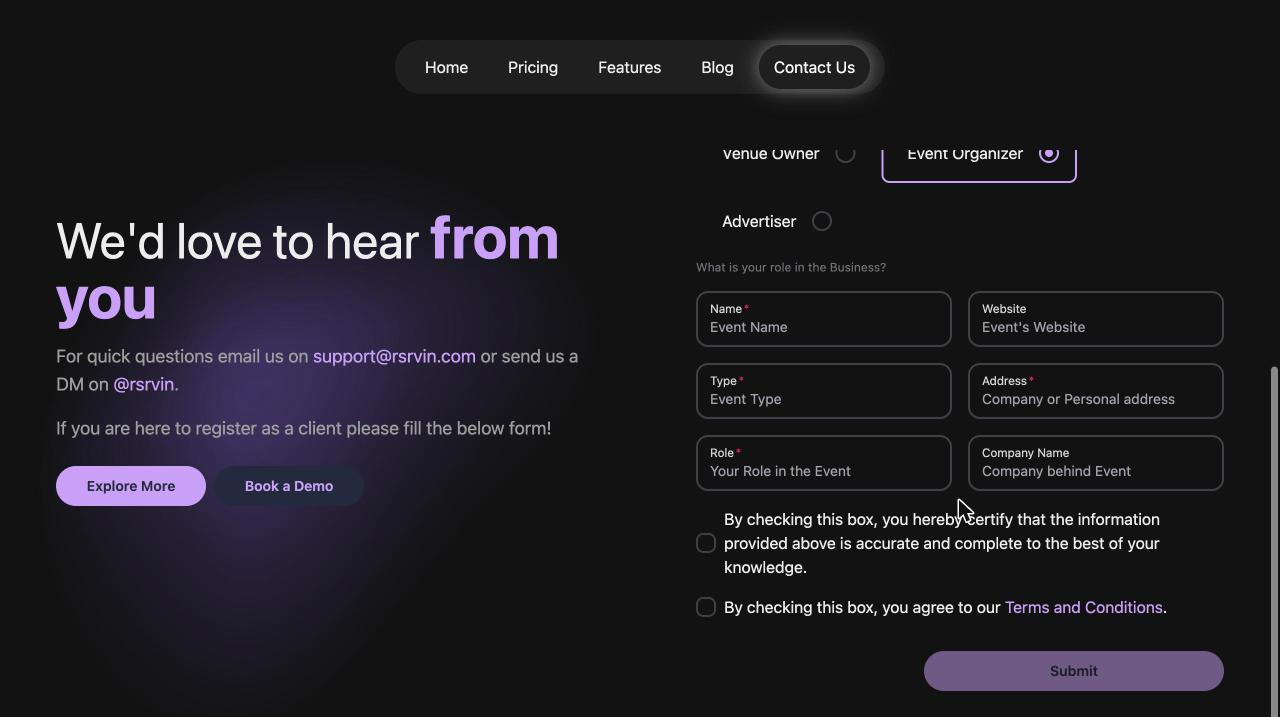
- Name: the name of your event or event brand.
- Website: your site or main social page, if you have one. Leave it empty if you do not.
- Type: what kind of events you run, for example concerts, club nights, or festivals.
- Address: your company address, or your personal address if you operate as an individual.
- Role: what you do, for example owner, producer, or marketing manager.
- Company Name: the business behind the event, if there is one.
Tick both boxes at the bottom, one confirming your details are accurate and one accepting the Terms and Conditions, then press Submit. Use an email address you check often, because everything that follows arrives there.
Step 2: Approval and Your Credentials
Submitting the form does not create your account immediately. Each application is reviewed by the RSRVIN team in the Back Office before access is granted.
As part of that review, a member of the team may contact you to discuss your plans before your account is approved. This is a short, friendly conversation rather than an examination. It exists so RSRVIN can confirm the details you submitted, understand the kind of events you intend to run, and make sure the commercial terms and the setup fit what you are trying to do. Organisers who go through this step tend to launch faster, because the account arrives configured for their situation rather than needing adjustment later.
Once your application is approved, your credentials are issued automatically and sent to the email address on your form. There is nothing further for you to do in the meantime.
Step 3: Log In and Choose Your Workspace
With your credentials in hand, go to manage-v2.rsrvin.com and sign in. This is the management area, separate from the public RSRVIN site your guests use.
The first screen asks where you want to go:
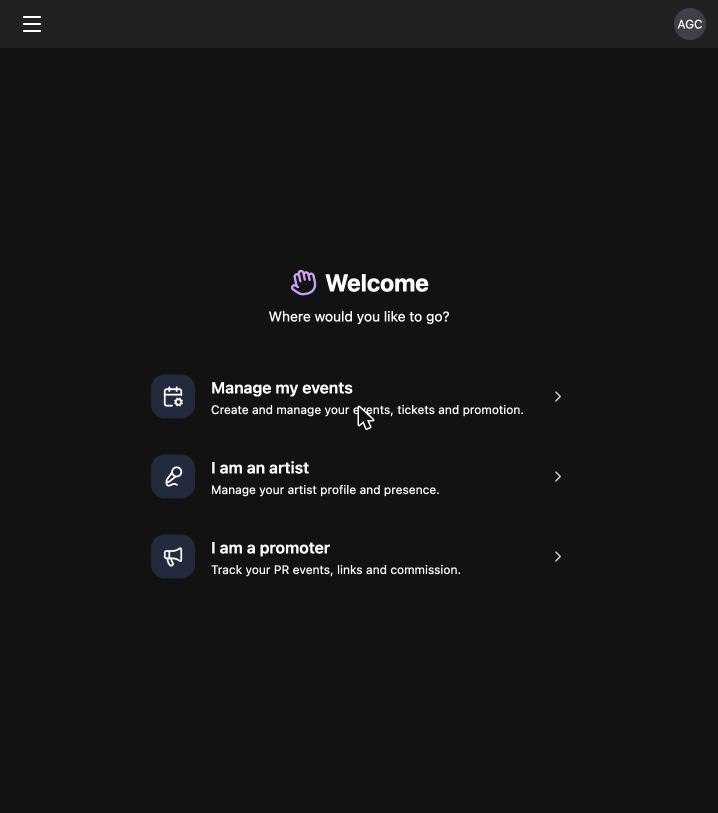
Choose Manage my events. The other two options (I am an artist and I am a promoter) are for different roles and are covered in their own guides. You can switch between them at any time from the menu in the top left corner, so nothing is locked down by this choice.
You now see your events list. To build your first one, press the + New Event button in the top right.
Step 4: Create Your Event in Four Steps
Event creation is a short wizard with four numbered stages across the top: Basic Info, When & Where, Guests & Tags, and Settings. You can move backwards and forwards freely, and a stage only turns into a tick once it is complete.
Basic info
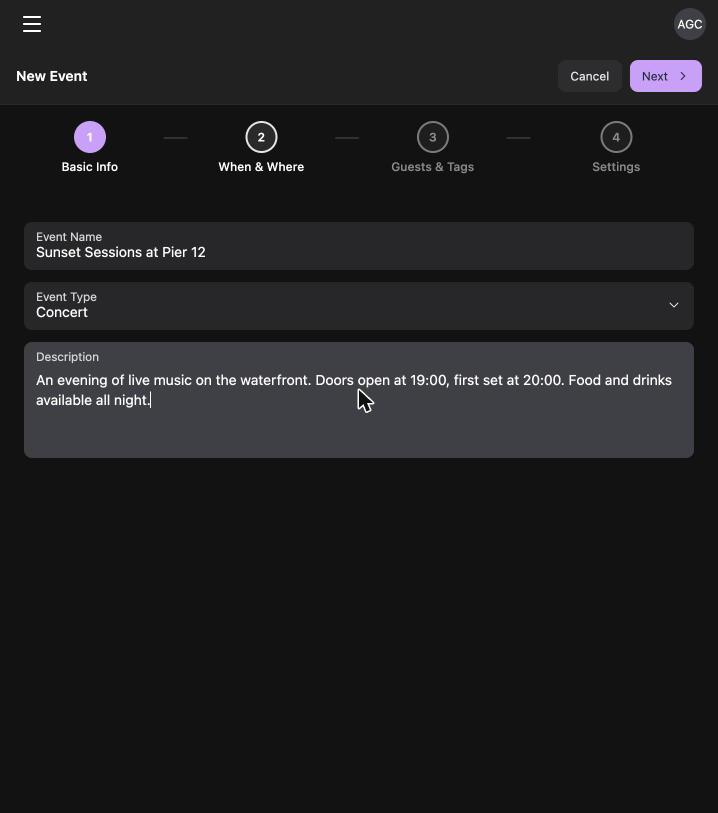
Three fields here. Give the event a name people will recognise, pick an Event Type from the dropdown (concert, beach party, exhibition, and so on), and write a short description. Keep the description practical: what is happening, when the doors open, and what is included. Guests read this before they decide to buy.
When and where
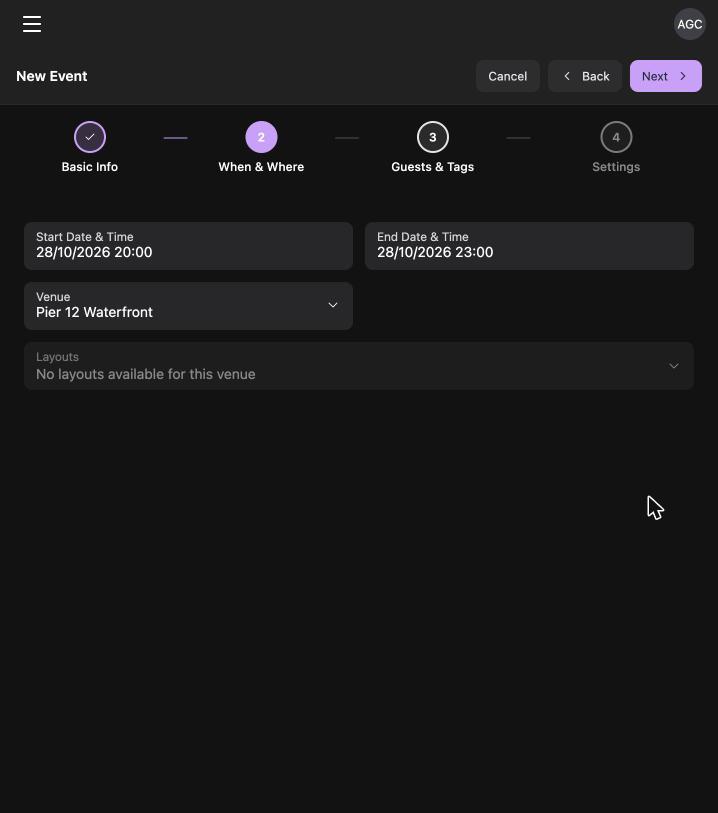
Set the Start Date & Time and the End Date & Time. Both are required, so the event will not continue until you have set an end. Pick the date from the calendar and the time from the list beside it.
Then search for your venue by name. If it is already on RSRVIN, select it and move on. If it is not, press Create venue:
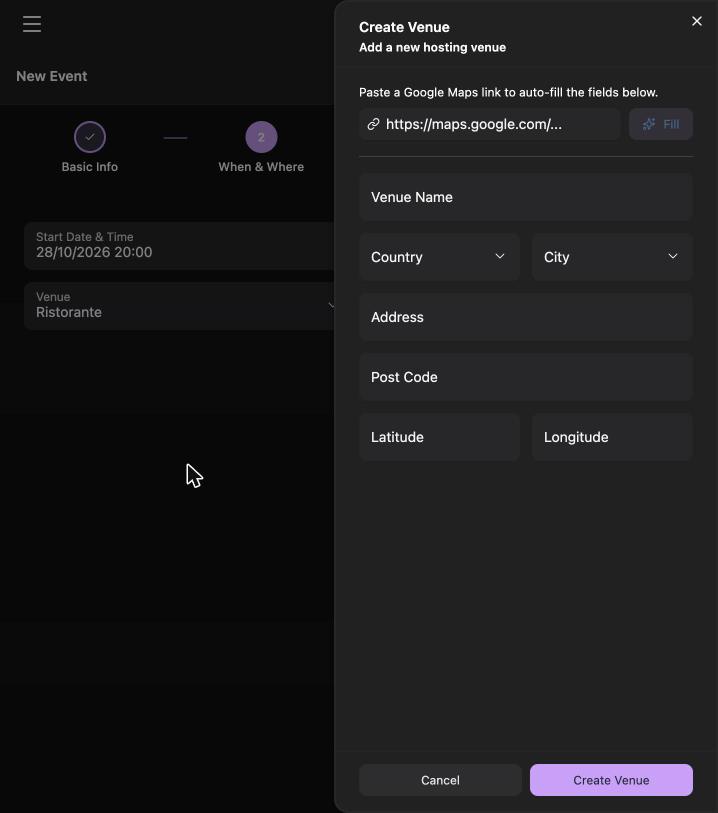
This is the part people worry about, and it is the easiest. Paste a Google Maps link for the place into the box at the top and press Fill. The name, country, city, address, post code, latitude, and longitude all populate from the link. Latitude and longitude are required, so using the Google Maps link saves you looking up coordinates by hand.
Line-up and tags
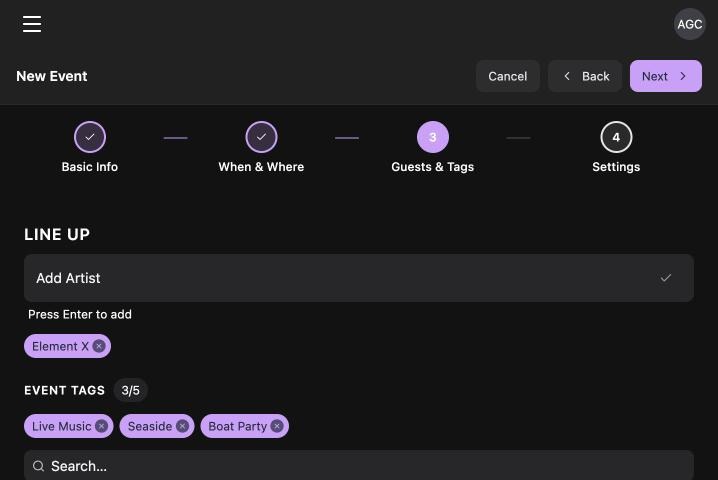
Under LINE UP, start typing a performer's name. Artists who have set up an RSRVIN profile appear in the list, and adding them links your event to their profile, which means their followers can see it too. Below that, choose up to five EVENT TAGS. Tags are how people filter and find events, so pick the ones a guest would actually search for.
Settings
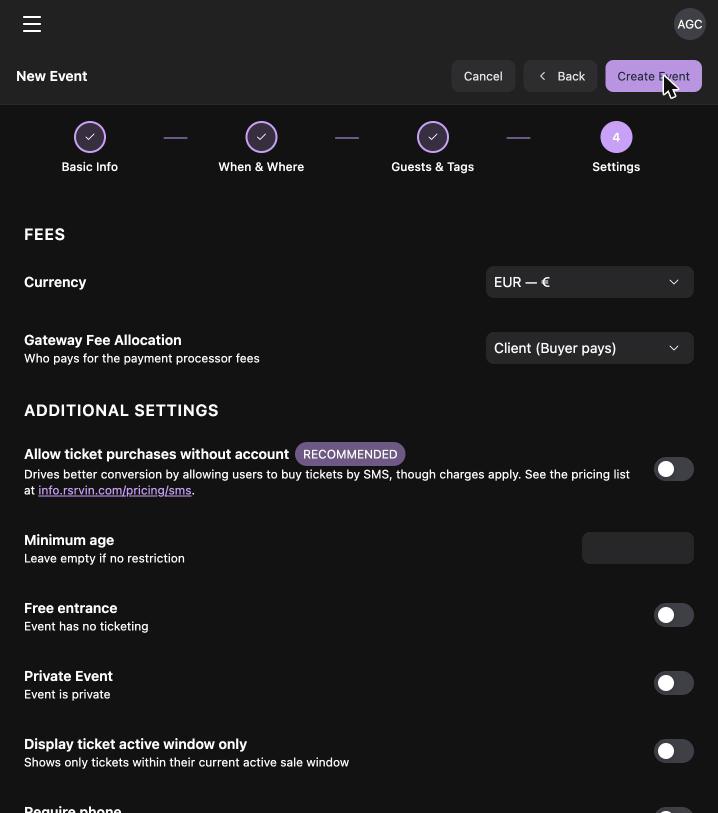
This stage is about money and rules:
- Currency: the currency your tickets are priced in.
- Gateway Fee Allocation: whether the buyer or you absorb the payment processor's fee.
- Allow ticket purchases without account: lets people buy by SMS without registering, which lifts conversion. Charges apply, and the rates are listed at info.rsrvin.com/pricing/sms.
- Minimum age: leave empty if there is no restriction.
- Free entrance: turn on only if there is no ticketing at all.
- Private Event: keeps the event off public listings.
- Require phone: makes buyers provide a phone number.
- EVENT TERMS: any conditions guests must accept at checkout.
Press Create Event and your event exists.
Step 5: Add Your Tickets
An event without tickets cannot sell anything, so this is the next job. Open the Tickets tab on your event and press + New Ticket.
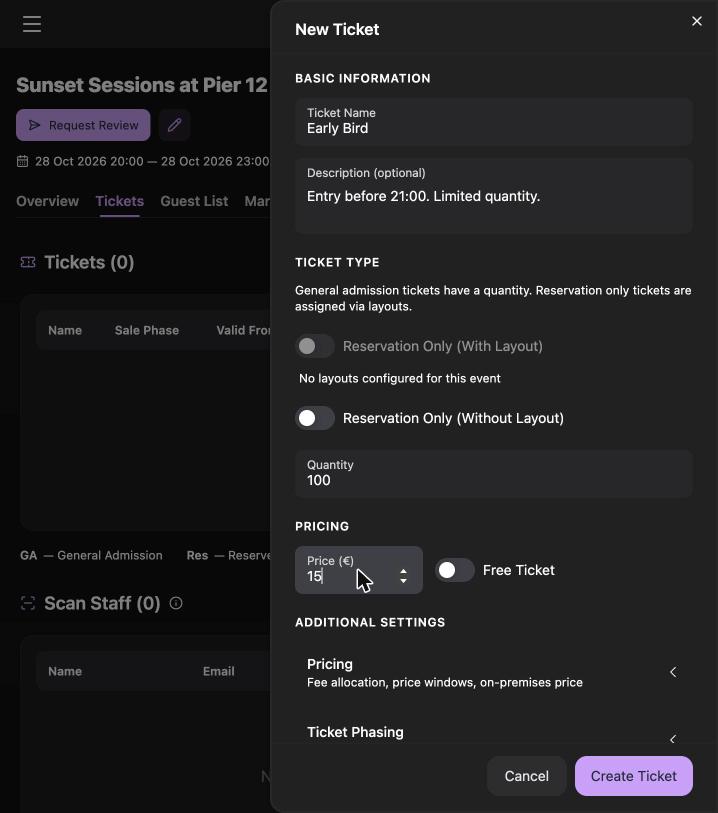
Give the ticket a clear name (Early Bird, General Admission, VIP), add a one-line description of what it includes, set the quantity, and set the price. You can create as many ticket types as you need, each with its own quantity and price.
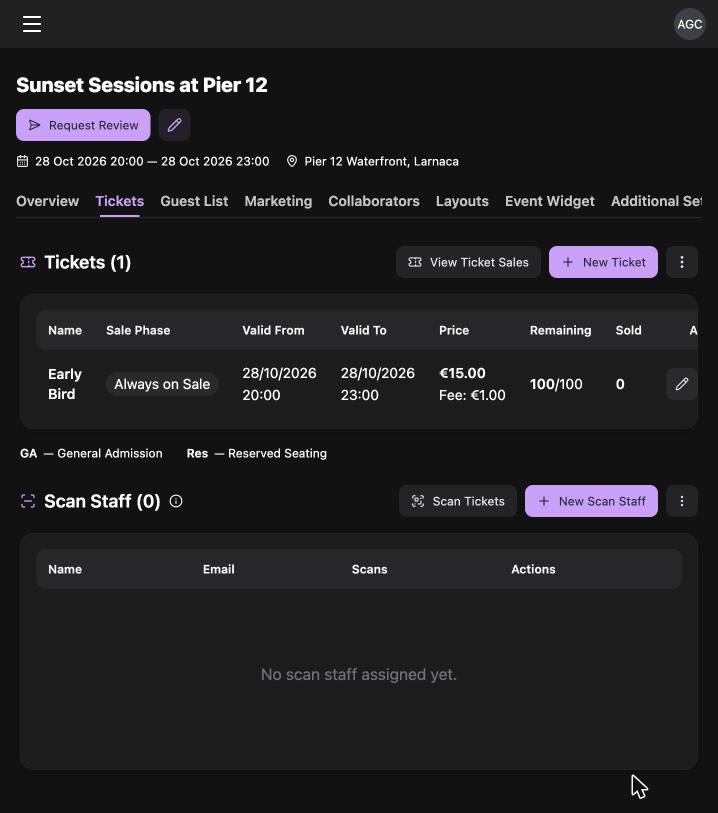
Once saved, the ticket appears in the table with its sale phase, validity window, price, fee, remaining quantity, and the number sold. The same screen holds Scan Staff, where you add the people who will scan tickets at the door.
Step 6: Send Your Event for Review
New events are not published the second you finish building them. When you are ready, press Request Review at the top of the event page.
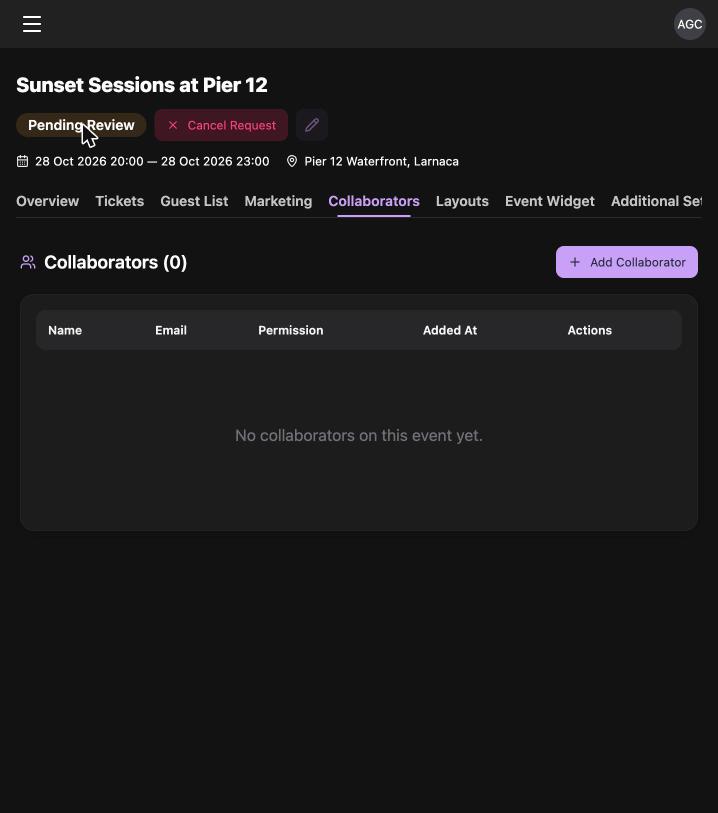
The status changes to Pending Review, and a Cancel Request button appears in case you spot something you want to change. The RSRVIN team then checks the event in the Back Office and sets it live. This review is a quality step that protects both you and the guests browsing the platform.
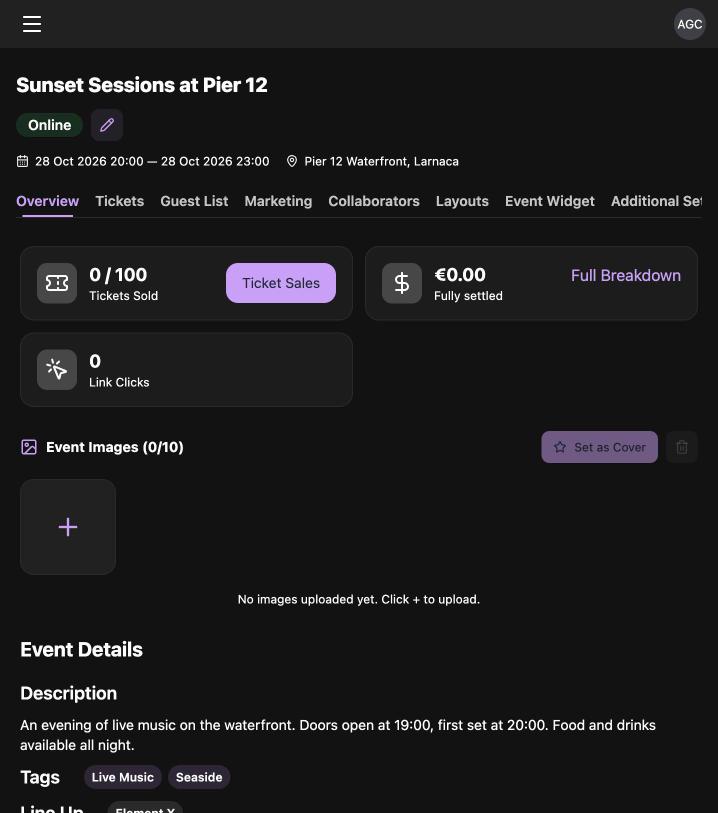
When the status reads Online, your event is public and tickets are on sale.
Step 7: Share It and Watch the Numbers
Your event now has its own page that anyone can open, with your description, line-up, tags, map, and a Get Tickets button.
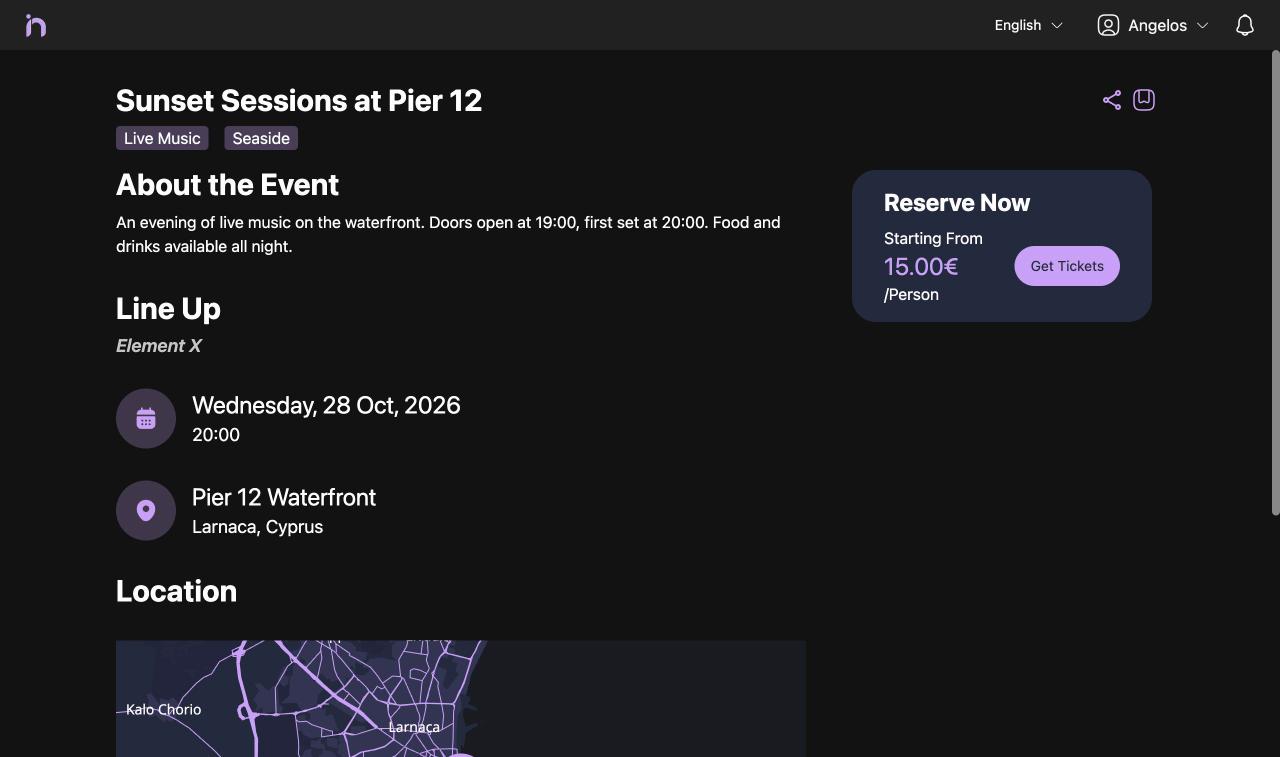
Two tools are worth setting up straight away. On the Overview tab, create a Short URL for the event. It gives you a short, clean link for posters and social posts, and it tracks clicks. On the Marketing tab, add promoters to the event and give each one a commission percentage. Each promoter then gets their own tracked link, and RSRVIN counts their clicks, sales, and commission automatically. The Marketing tab also holds promo codes and a Meta Pixel connection for your own advertising.
Set Up Your Organiser Profile
One last thing that is easy to skip and worth doing. Under Events in the menu, open Organizer Profile.
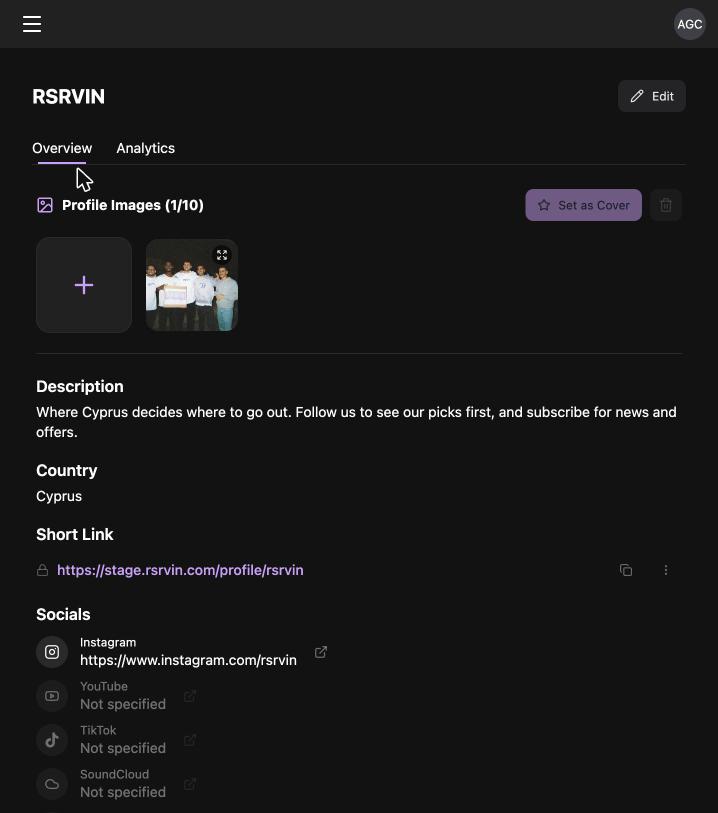
Add images, a short description of who you are, your country, a custom short link, and your social accounts. This profile is public. People who like one of your events can follow you from it and see everything else you put on, which turns a single night out into a returning audience. The profile also carries its own Analytics tab.
Frequently Asked Questions
How much does it cost to register as an event organiser on RSRVIN? Registration is free and there is no subscription fee for Event Organisers. RSRVIN earns through a service fee applied to ticket transactions, which is collected as part of the ticket purchase price and shown to the buyer before they confirm. There is also a processing fee charged by the payment provider. Because the model is transaction based, you only generate a cost to yourself when you are actually selling tickets. Current fee details are published at info.rsrvin.com.
How long does approval take? Approval times vary with how complete your application is and whether the team needs to speak with you first. Your submission is reviewed in the Back Office, a team member may contact you to confirm details and understand the events you plan to run, and your credentials are then issued automatically by email. The most useful thing you can do to speed this up is to fill in every field accurately, give a working phone number, and use an email address you check regularly.
When do I get paid for my ticket sales? RSRVIN transfers the face value of all tickets sold to you within seven days after your event's end date. Face value is the price you set, before the service fee and processing fee that sit on top of it at checkout. You can watch sales and revenue build in real time on your event dashboard before the payout arrives, and the Full Breakdown link on the event overview shows how the money is split.
Can I sell tickets if my venue is not listed on RSRVIN? Yes. During the second step of event creation you can press Create venue and add it yourself. Paste a Google Maps link for the location, press Fill, and the name, address, post code, and coordinates are completed automatically. The venue is then available for this event and any future ones you run there. This is useful for one-off locations such as a beach, a rooftop, or a private estate that would never appear as a listed venue.
Who handles refunds? You do. As the Event Organiser you make all refund decisions, and RSRVIN processes a refund only on your express written instruction. If an event is cancelled, guests are entitled to the face value of their ticket. Service fees and processing fees are non-refundable in all cases. It is worth publishing your refund policy in the EVENT TERMS field during event setup so buyers accept it at checkout and know where they stand before they pay.
Get Your First Event Live
The process to register as an event organiser on RSRVIN comes down to one form, a short approval, and a four-step wizard. Most of the work is deciding what your tickets should cost, not fighting with software. Once your first event is online you have a public event page, digital tickets with QR entry, live sales figures, a promoter network you can pay on commission, and a payout within seven days of the final night.
Ready to put your next event in front of the people already looking for it? Start your registration at info.rsrvin.com/contact.