
How to Get Started as a Promoter on RSRVIN
Promoting used to mean handing out flyers and hoping somebody mentioned your name at the door. On RSRVIN, every ticket you bring in is counted automatically, attributed to you, and turned into commission you can see in real time. This guide shows you how to get started as a promoter on RSRVIN, from creating a free account to sharing your first tracked link. Every step has a screenshot. Nothing here needs technical skill, and the whole setup takes around ten minutes.
What a Promoter Does on RSRVIN
The idea is simple. An event organiser adds you to one of their events and agrees a commission percentage with you. RSRVIN then gives you a personal link to that event. Anyone who buys through your link is recorded as your sale, and your commission is calculated for you.
That changes the job in three practical ways:
- Nothing depends on memory. No guest lists, no "tell them I sent you", no arguments afterwards about who brought whom.
- You can see what is working. Clicks, tickets sold, and conversion rate are shown per event, broken down by where the traffic came from.
- You are paid on results. Your commission is tied to real, verified ticket sales, and both you and the organiser are looking at the same numbers.
You also get a public promoter profile, which is what makes organisers able to find you in the first place.
Step 1: Create a Free RSRVIN Account
Promoters start in the same place as everyone else. Go to www.rsrvin.com, press Log In in the top right, then choose Sign Up.
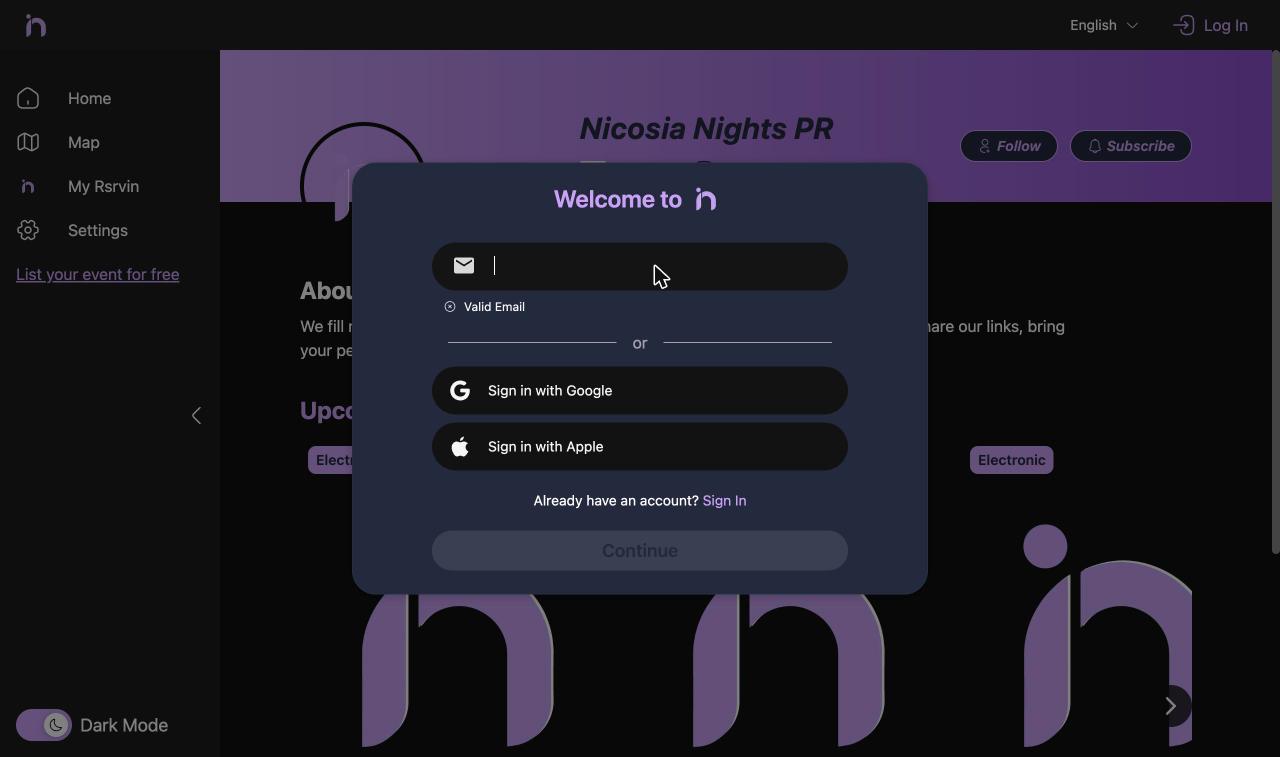
Register with an email address, or with Google or Apple. There is no separate promoter registration form and no waiting for approval at this stage. You are creating a standard RSRVIN account.
Step 2: Open the Management Area
Now go to manage-v2.rsrvin.com and sign in with the account you just made. This is the management side of RSRVIN, and your login works there straight away.
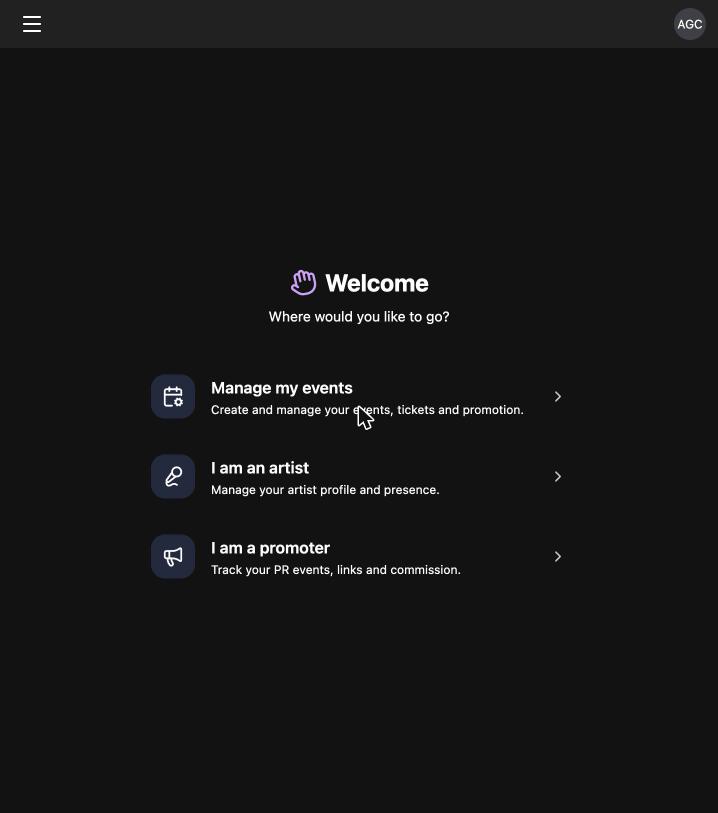
Choose I am a promoter. You can move between the organiser, artist, and promoter areas whenever you like using the menu in the top left corner, so nothing is locked by this choice. Under Promoter in that menu you will find two items: Events and Profile.
Step 3: Set Up Your Promoter Profile
Open Promoter then Profile, and fill in the form.
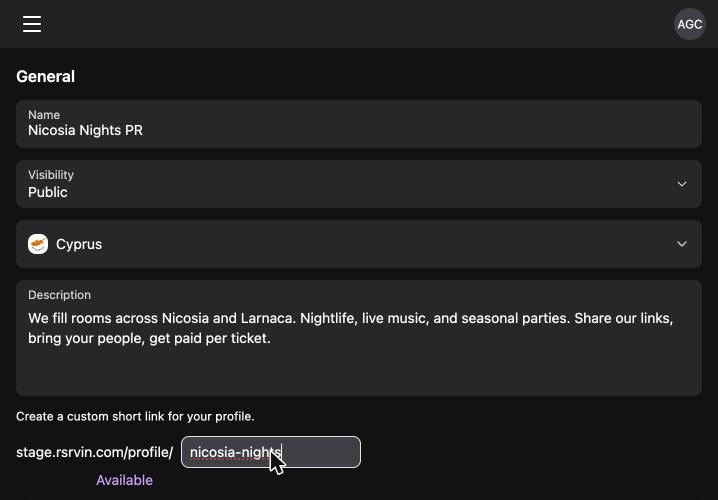
- Name: your promoter name or crew name, written the way you want organisers to see it.
- Visibility: keep this on
Public, otherwise organisers cannot find you when they search. - Country: where you work.
- Description: two or three sentences on what you do. Mention the cities you cover and the kind of nights you fill. An organiser reading this is deciding whether your audience matches their event.
- Short link: your custom profile address, for example
rsrvin.com/profile/your-name. Pick something short, because this exact text becomes the code attached to every tracked link you are given.
Underneath, choose your TAGS. These describe the music and event types you promote, and organisers use them to filter. Use the search box above the tag list rather than scrolling through all of them.
Add your social links in the Socials block further down, then press Save.
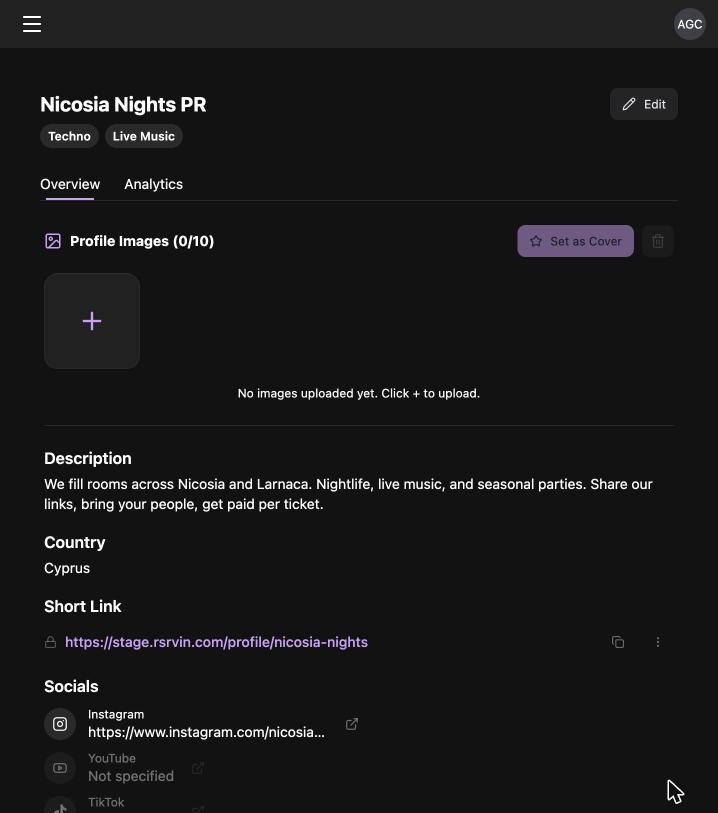
Your profile saves and opens in view mode. Add up to 10 images and set one as your cover. There is also an Analytics tab that fills in as traffic arrives.
Step 4: Check Your Public Page
Open your short link in a browser to see what organisers and guests see.
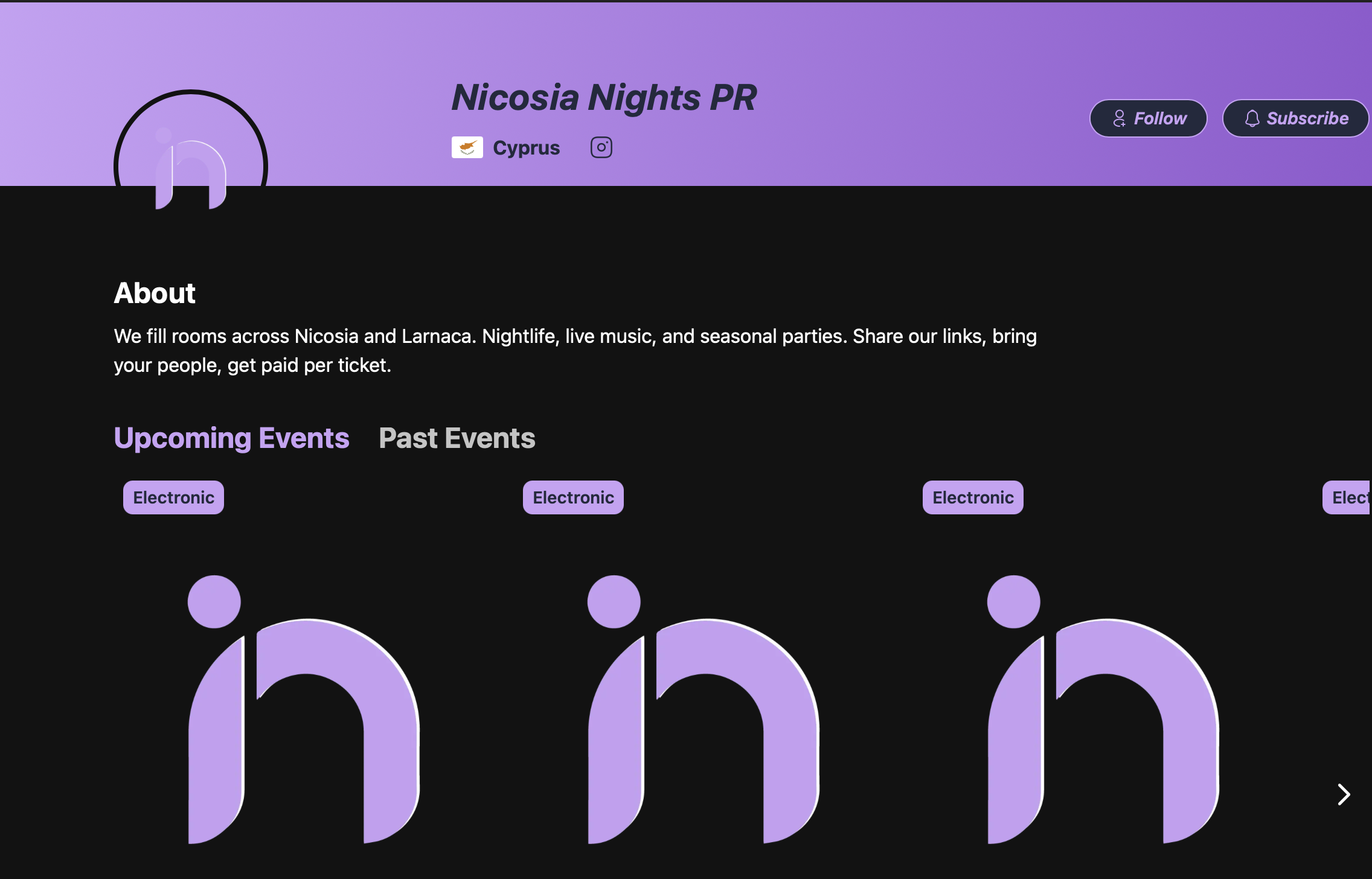
Your public page carries your name, country, socials, description, and tabs for Upcoming Events and Past Events. It also has Follow and Subscribe buttons, so people who like the nights you promote can keep track of what you are working on next. Over time this becomes a real asset: an audience that follows you rather than any single venue.
Step 5: Get Added to an Event
This is the one step you do not do yourself. An event organiser adds you to their event from the Marketing tab of that event, searches for your promoter name, and sets your commission percentage.
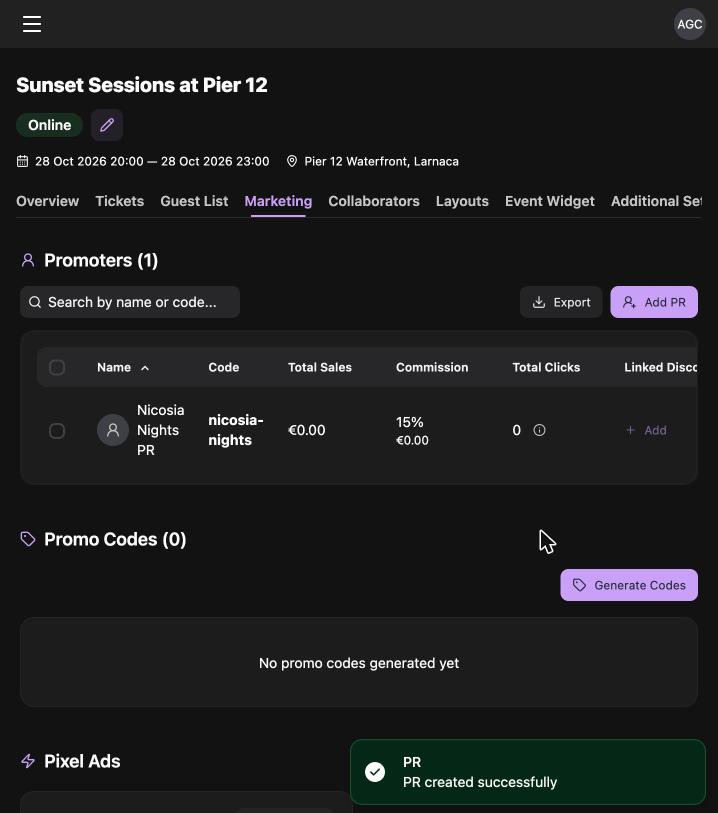
That screen is the organiser's side of your arrangement. It shows your name, your code (taken from your profile short link), total sales, commission, total clicks, and any linked discount. Both of you see the same figures, which is exactly why there is nothing to argue about later.
Two things make this easy for an organiser to say yes to. First, having a public profile means you are searchable, so adding you takes them four seconds. Second, because everything is tracked, they can offer commission with confidence rather than guessing at your contribution.
Once you have been added, the event appears in your own list under Promoter then Events.

The list is filtered by All, Online, Pending, Offline, and Past, so you can see at a glance which of your events are actually selling.
Step 6: Share Your Link and Your QR Code
Open one of your events. In the top right corner there are two small buttons: one copies your tracked link, the other opens the QR code export.
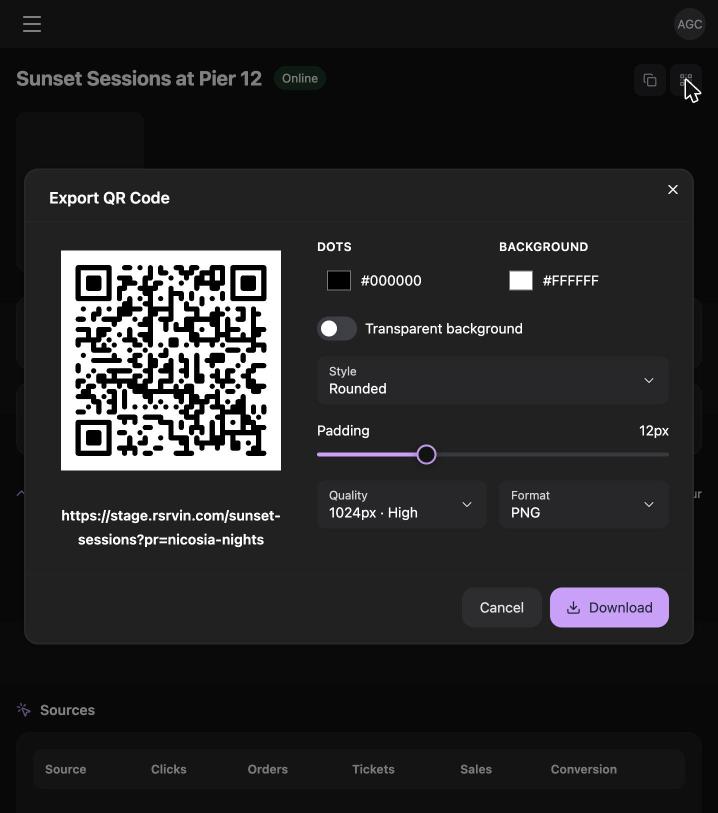
Your tracked link follows a simple pattern: the event's short address with your promoter code attached, for example rsrvin.com/sunset-sessions?pr=nicosia-nights. Anyone who opens it lands on the normal event page and buys as usual. The tracking happens quietly behind the scenes.
The QR export is more useful than it looks. You can set the dot colour and background colour, turn the background transparent, change the dot style, adjust the padding, pick the resolution, and download it as a PNG. That gives you a code that matches your own artwork, ready to drop onto a poster, a story, or a flyer. The QR carries the same tracking as the link, so a scan from a poster counts as your sale.
Use the copy button for messages, stories, and bios, and the QR for anything printed or visual.
Step 7: Watch Your Commission Build
Open any of your events to see how it is performing.
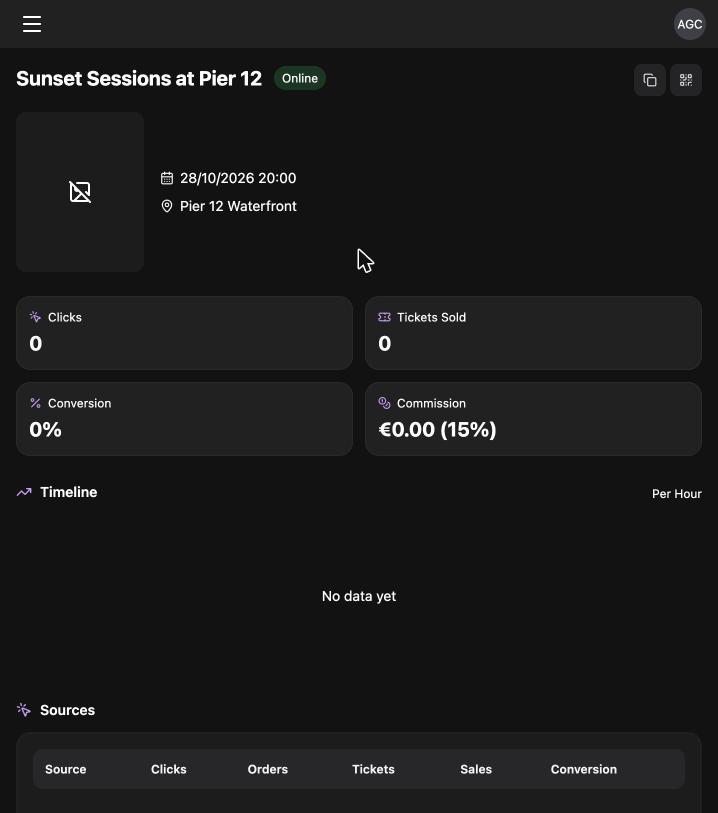
Four figures sit at the top: Clicks, Tickets Sold, Conversion, and Commission, with your agreed percentage shown beside the amount. Below them is a timeline chart plotting clicks, orders, and sales per hour, which tells you when your posts actually landed.
Scroll further and you get a Sources table showing where the traffic came from, a Tickets table breaking commission down by ticket type, and a Promo Codes table if the organiser has linked a discount code to you.
Together these turn promotion into something you can improve. If a story posted at 20:00 produced 40 clicks and three sales, you know what to repeat. If a link got clicks but no sales, the problem is the price or the event page, not your reach.
Frequently Asked Questions
Does it cost anything to become a promoter on RSRVIN? No. Creating an RSRVIN account is free, setting up a promoter profile is free, and there is no subscription or listing fee. You are not charged for tracked links, QR codes, or the analytics on your events. Your earnings come from the commission percentage agreed with each event organiser, which is set per event rather than fixed across the platform. Because the arrangement is between you and the organiser, you can agree a different rate for different events.
Do I need approval before I can promote? Your profile itself does not need approval. You register on www.rsrvin.com, sign in at manage-v2.rsrvin.com, create the profile, and it is live immediately. What you do need is an organiser to add you to a specific event, because your tracked link only exists once they have done that and set your commission. So the practical first move after setting up is reaching out to organisers whose events suit your audience, with your public profile link in hand.
How does RSRVIN know a ticket came from me? Your profile short link becomes your promoter code, and that code is attached to every link and QR code you are given for an event. When someone opens your link, RSRVIN records the click and remembers the source through to checkout. If they buy, the sale is attributed to you and your commission is calculated on it. The Sources table on your event dashboard shows the breakdown, so you can see what came through your link against other traffic.
What is the difference between a promoter profile and an artist profile? They sit in different parts of the menu and do different jobs. An artist profile has a Type field (musician, band, dancer, and so on) and exists so organisers can add you to an event line-up as a performer. A promoter profile has no type and exists so organisers can attach you to an event as a seller with a commission. The forms look similar because both carry a name, bio, country, short link, tags, and socials. You can hold both on one account if you perform and promote.
Can I promote more than one event at a time? Yes, and most promoters do. Every event an organiser adds you to appears in your list under Promoter then Events, each with its own tracked link, its own QR code, its own commission percentage, and its own statistics. Nothing is shared between them, so a strong month on one event does not blur the numbers on another. The tabs across the top of that list let you separate what is currently Online and selling from what is still Pending or already Past.
Start Earning on What You Already Do
If you already bring people out, you are already doing the work. Becoming a promoter on RSRVIN just means that work gets counted. A free account, a public profile organisers can search, a tracked link and QR code for every event, and a dashboard that shows clicks, sales, and commission as they happen.
Set yourself up in the next ten minutes. Create your free account at www.rsrvin.com, then build your promoter profile at manage-v2.rsrvin.com and start talking to organisers.