
How to Set Up Your Artist Profile on RSRVIN
Most performers are easy to book and hard to find. Your music is on one platform, your photos on another, your gig history in a chat thread somewhere. An artist profile on RSRVIN pulls all of it into one public page that promoters and event organisers can search, and that your audience can follow. Setting it up takes about ten minutes and costs nothing. This guide walks through every screen with a screenshot, written for people who would rather be rehearsing than learning software.
Why an Artist Profile Is Worth Ten Minutes
Organisers search RSRVIN for performers. When an event organiser builds a line-up, they type a name into a search box and pick from the artists who have profiles. If you do not have one, you are not in that list.
Your name travels with the event. When an organiser adds you to a line-up, your profile links to that event, and the event links back to you. Someone who buys a ticket because of the headliner can find you on the same page.
People can follow and subscribe. Your public page has Follow and Subscribe buttons. Everyone who presses them becomes an audience you keep, not an audience the venue keeps.
Every gig is archived for you. Your profile shows Upcoming Events and Past Events automatically, so your gig history builds itself as you play.
You get one link for everything. Instead of sending a promoter four links, you send one, and it carries your bio, photos, music, socials, and dates.
Step 1: Create a Free RSRVIN Account
Artists start exactly where guests start. Go to www.rsrvin.com, press Log In in the top right corner, then choose Sign Up.
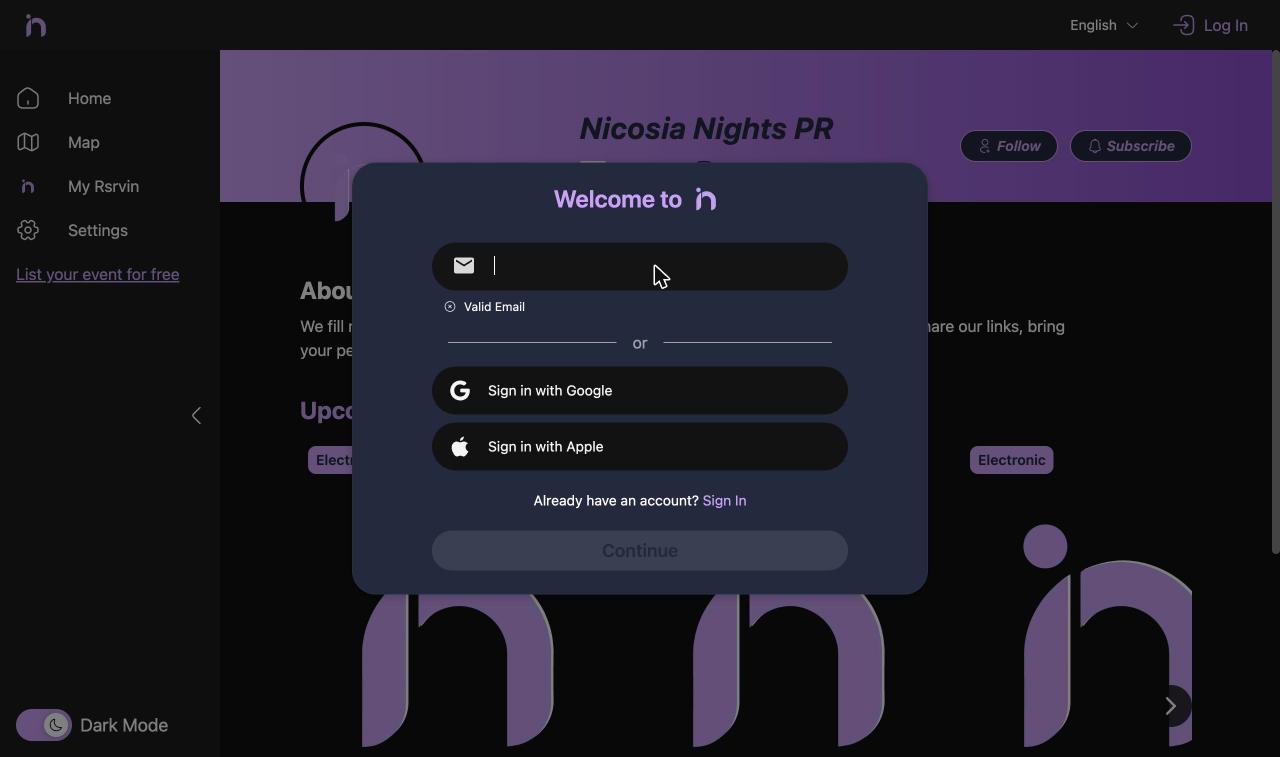
You can register with an email address, or with Google or Apple if you would rather not manage another password. There is no special artist registration and no approval queue at this stage. You are creating a normal RSRVIN account, the same kind a guest buying a ticket would have.
Use an email you check often. Everything related to your profile and your bookings goes there.
Step 2: Open the Management Area
Now switch to the management side of RSRVIN. Go to manage-v2.rsrvin.com and sign in with the account you just created. Same credentials, different address.
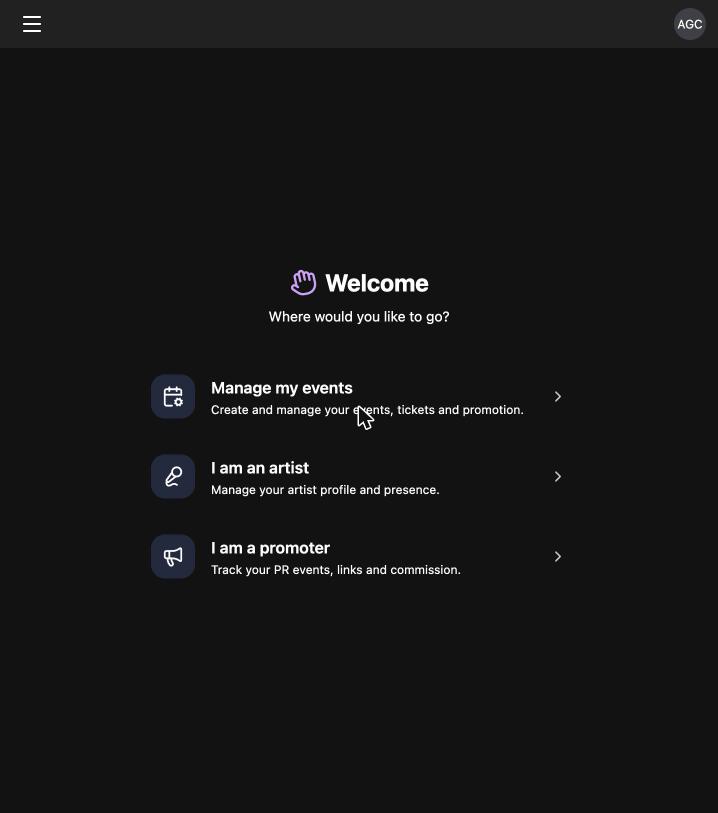
The welcome screen asks where you want to go. Choose I am an artist. The other options are for organisers and promoters, and you can move between all three at any time from the menu in the top left, so this choice is not permanent.
Step 3: Add Your Profile
You land on a Profiles page. If you have never set anything up, it is empty. Press + Add Profile in the top right.
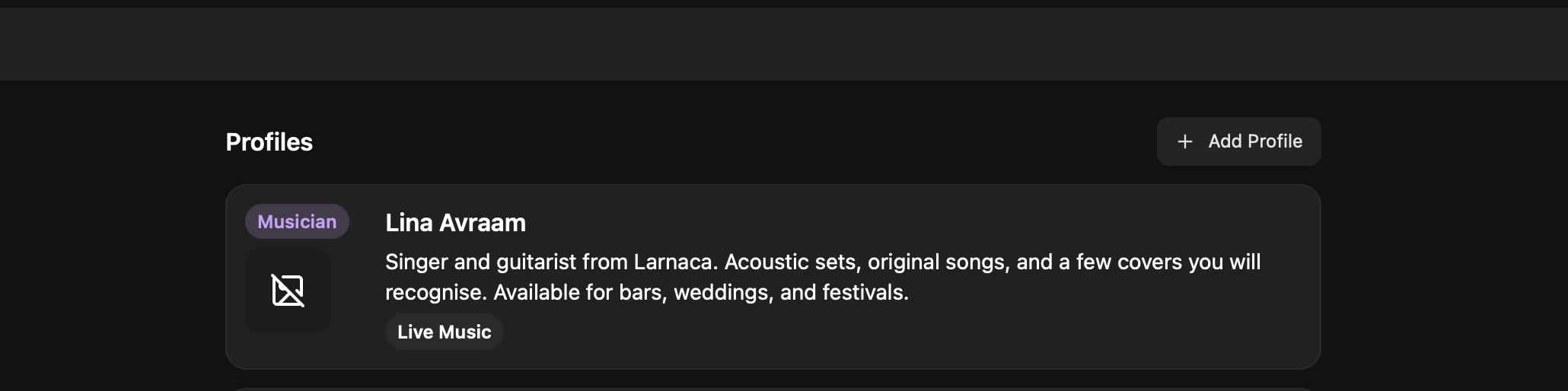
You can hold more than one profile on the same account. A drummer who also DJs, or a solo artist who also runs a band, can keep both separate without a second login.
Step 4: Fill In Your Details
The Create Profile form is one page. Start with the Type dropdown, which is what tells RSRVIN what kind of performer you are:
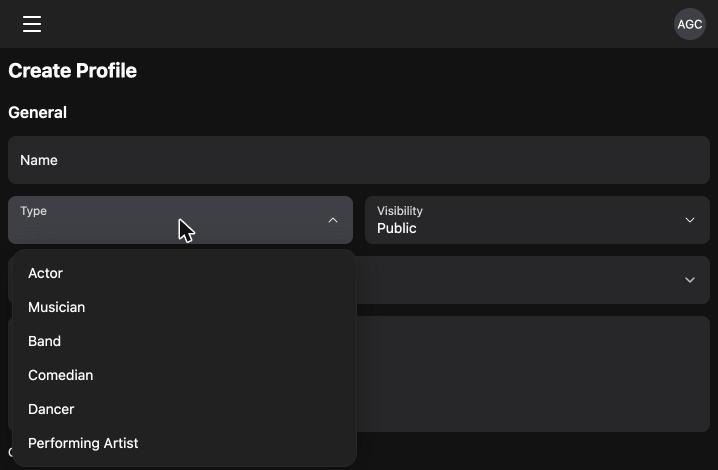
The options are Actor, Musician, Band, Comedian, Dancer, and Performing Artist. Pick the closest match. This is not a label that limits you, it is how organisers filter when they are looking for someone.
Then complete the rest:
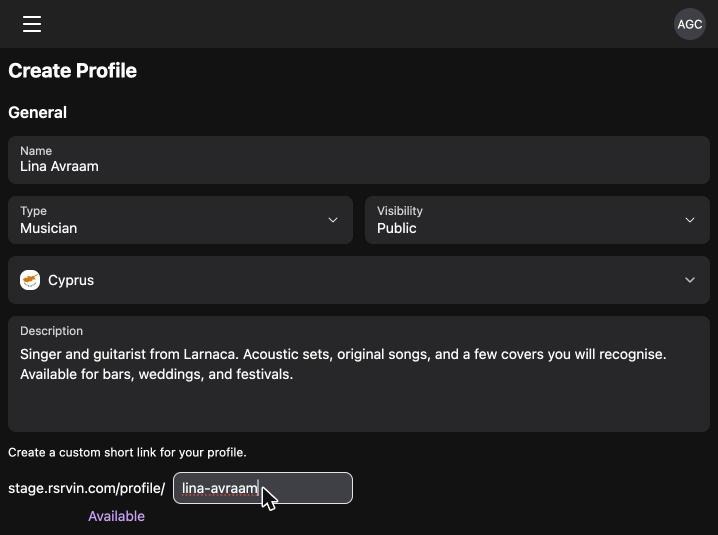
- Name: your stage name, spelled exactly as you want it to appear on posters.
- Visibility: leave this on
Publicso organisers and guests can find you. - Country: where you are based.
- Description: a short, honest bio. Say what you play, where you are from, and what kind of booking suits you. Two or three sentences is plenty.
- Short link: the custom web address for your profile, for example
rsrvin.com/profile/your-name. The form checks availability as you type and showsAvailablein purple when the name is free. Choose something short and memorable, because this is the link you will be sending to people for years.
Below the form, choose your TAGS. These describe your sound or style, and they are another way organisers narrow a search. Use the search box above the tag list to find the right ones quickly rather than scrolling the whole set.
Step 5: Link Your Music and Socials
Scroll down to the Socials block:
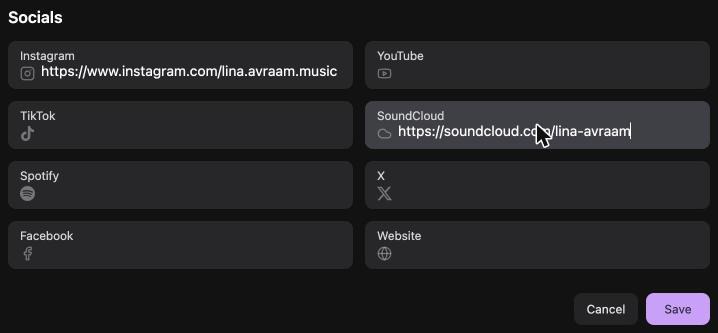
There are eight fields: Instagram, YouTube, TikTok, SoundCloud, Spotify, X, Facebook, and your website. Fill in the ones you actually use and leave the rest empty.
This is the section worth taking seriously. An organiser deciding between two artists will click straight through to hear you, and an empty socials block means they have nothing to click. If you only add two links, make them the one where your music lives and the one where you post most.
Press Save when you are finished.
Step 6: Check Your Profile
Your profile saves and opens in view mode immediately:
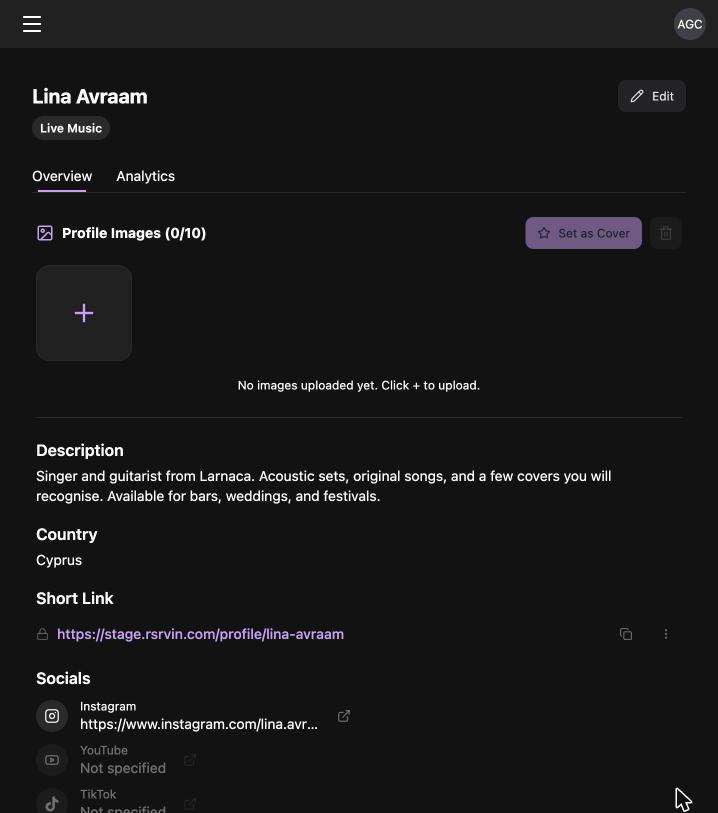
From here you can upload up to 10 profile images and set one as your cover. Photos matter more than anything else on the page, so add real ones from a gig rather than a logo. There is also an Analytics tab that fills in over time as people visit.
Now open your short link in a browser and look at what everyone else sees:
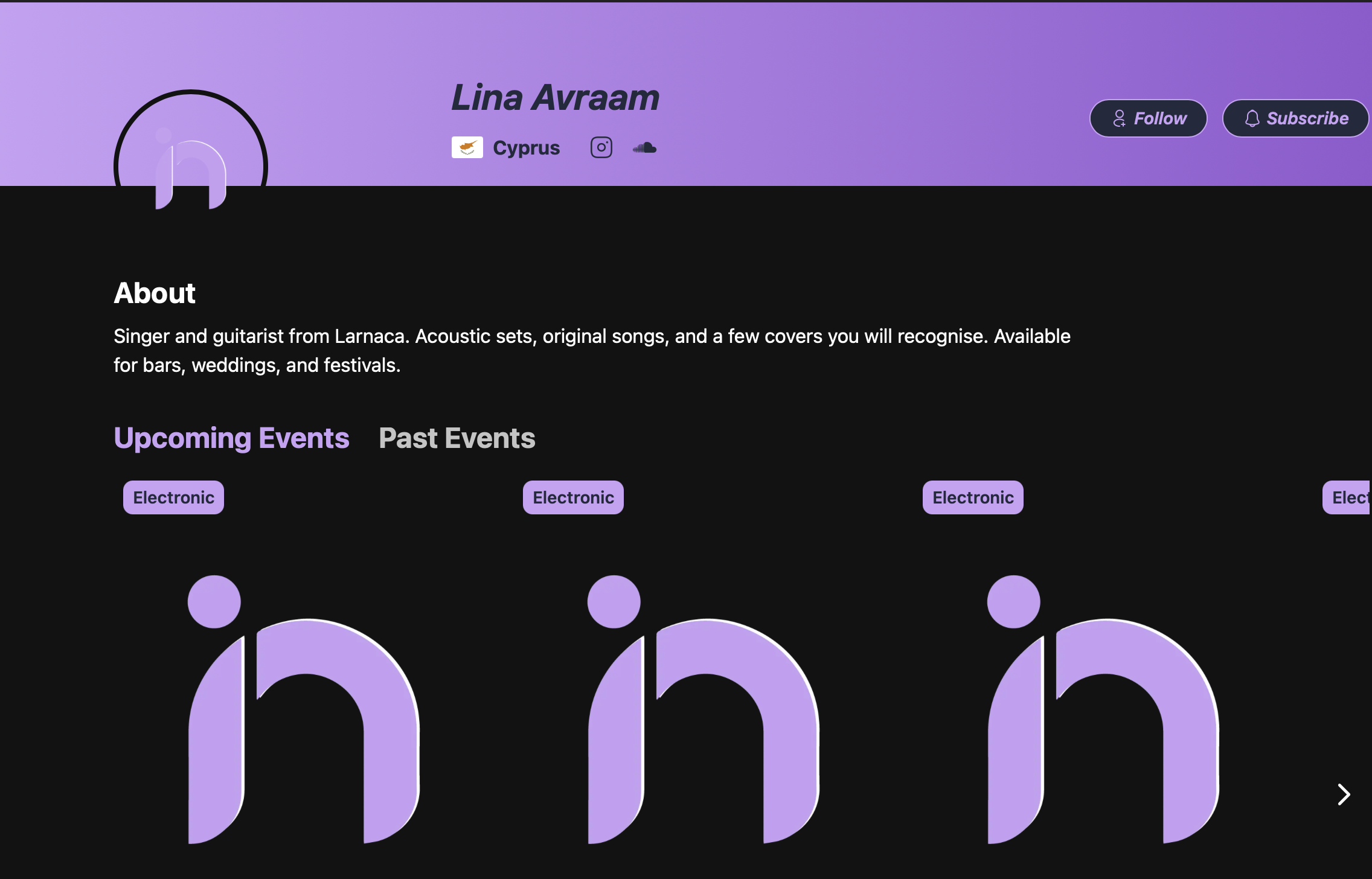
That is your public artist page: your name, your country, your social icons, your bio, and tabs for Upcoming Events and Past Events. The Follow and Subscribe buttons are how a stranger at a show turns into someone who hears about your next one.
What Happens Next
You do not need to do anything else. From this point your profile is searchable by every event organiser on RSRVIN. When one of them builds an event and types your name into the line-up field, you appear in their results. Once they add you, your profile and their event are linked in both directions, so their ticket buyers can find you and your followers can see the show.
The only ongoing work is keeping it current. Refresh your photos after a good gig, add a new social link when you start posting somewhere new, and update your bio when what you offer changes. A profile that looks active gets booked more often than one that looks abandoned.
Frequently Asked Questions
Does it cost anything to have an artist profile on RSRVIN? No. Creating an RSRVIN account is free, and setting up an artist profile is free. There is no subscription, no listing fee, and no commission taken from your performance fee, because RSRVIN is not involved in what an organiser pays you. The platform earns a service fee on ticket sales, which is paid by the ticket buyer as part of the purchase price. Your profile, your links, your photos, and your event history all sit on the free tier with nothing to upgrade.
Do I need to be approved before my artist profile goes live? No. Unlike event organiser accounts, which are reviewed by the RSRVIN team before credentials are issued, artist profiles publish as soon as you press Save. You register as a normal user on www.rsrvin.com, sign in at manage-v2.rsrvin.com, create the profile, and it is immediately public at your short link. Set Visibility to Public during setup, otherwise your profile will not appear in organiser searches.
Can I have more than one artist profile? Yes. The Profiles page lets you add several profiles under a single login, which suits anyone who performs in more than one form. A producer who also plays live, a musician who is part of a band, or a dancer who also teaches can keep each identity separate with its own name, type, bio, tags, short link, and socials. Each profile appears separately in organiser searches, so a booking for one does not confuse the other.
How do event organisers find me? When an organiser creates an event on RSRVIN, the third step of the wizard has a LINE UP field. They type a name and the platform suggests matching artist profiles. Your Type and your TAGS are what make you findable for the right kind of booking, so a Musician tagged Live Music and Folk surfaces for different events than a performer tagged Techno. Once an organiser selects you, your name is attached to that event and the two pages link to each other.
What should I put in my description? Keep it short and specific. Say what you do, where you are based, and what sort of booking works for you. Something like "Singer and guitarist from Larnaca, acoustic sets and original songs, available for bars, weddings, and festivals" tells an organiser everything they need in one line. Avoid long artist statements and avoid listing every influence you have ever had. The organiser reading it is deciding whether you fit a specific night, not writing a review.
Put Your Name Where the Bookings Are
Setting up an artist profile on RSRVIN is a free, ten-minute job with a long tail. You end up with one link that holds your bio, photos, music, socials, and gig history, a page people can follow, and a listing that event organisers across the platform can search when they are building a line-up.
Your next booking starts with someone being able to find you. Create your free account at www.rsrvin.com, then set up your profile at manage-v2.rsrvin.com.